- Published on
將公司專案轉換成 Monorepo 遇到的那些事 - 第五篇 解決 Circular Dependency 問題:實戰經驗分享
- Authors
-
-

- Name
- Alex Yu
-
第五篇 解決 Circular Dependency 問題:實戰經驗分享
前言:從 Monorepo 轉型到依賴管理的挑戰
在前幾篇文章中,我們探討了 Monorepo 的概念、優勢以及使用 Nx 進行轉型的流程。然而,隨著專案模組化程度提高,一個常被忽略但影響深遠的問題漸漸浮現 —— Circular Dependency(循環依賴)。這個問題不僅會影響編譯效率,更可能導致程式無法正常執行,是 Monorepo 架構中的一大隱憂。
本文作為「將公司專案轉換成 Monorepo 遇到的那些事」系列的第五篇,將聚焦於:
- Circular Dependency 的本質與危害
- 為何在 Nx Monorepo 中尤其需要重視此問題
- 多種解決循環依賴的策略與模式
- 實戰案例:如何分析並解決一個真實的循環依賴問題
什麼是 Circular Dependency?
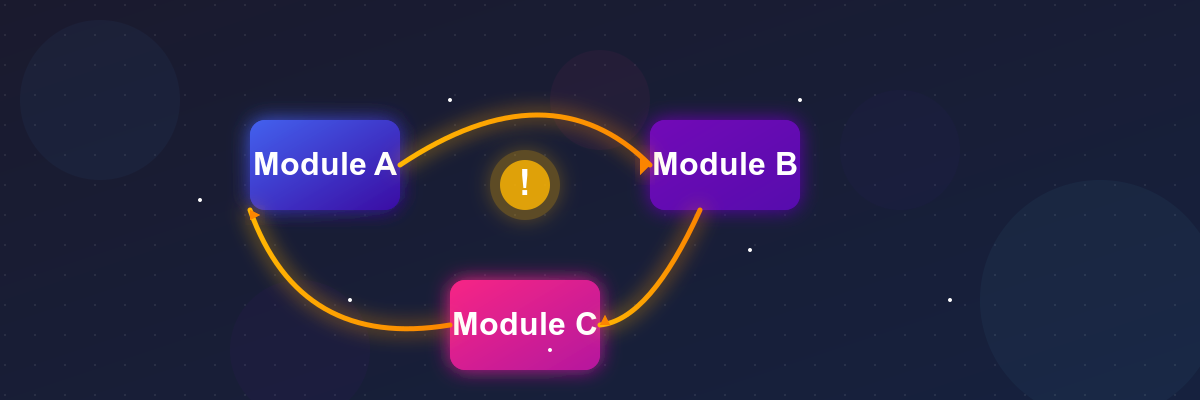
Circular Dependency(循環依賴)指的是兩個或多個模組之間形成了環狀的依賴關係。最簡單的情況是:
- 模組 A 依賴於模組 B
- 模組 B 又依賴於模組 A
更複雜的情況可能涉及三個或更多模組:
- 模組 A 依賴模組 B
- 模組 B 依賴模組 C
- 模組 C 又依賴回模組 A
這種循環依賴會導致以下問題:
初始化順序的不確定性
當存在循環依賴時,JavaScript 模組的初始化順序會變得不確定,可能導致部分模組在依賴尚未初始化完成時就被呼叫,引發 undefined 錯誤。
// moduleA.js
import { functionB } from './moduleB';
export const functionA = () => {
  console.log('Function A called');
  functionB();
};

// moduleB.js
import { functionA } from './moduleA';
export const functionB = () => {
  console.log('Function B called');
  functionA(); // 可能在某些情況下變成 undefined
};
編譯與打包問題
現代前端工具如 Webpack、Rollup 等打包工具在處理循環依賴時可能產生非預期結果,導致打包後的程式碼行為與開發環境不一致。
難以維護與理解
循環依賴使程式碼的流程變得難以理解,增加了維護難度和引入 bug 的風險。當新開發者加入團隊時,循環依賴的存在會大大增加他們理解程式碼結構的難度。
為什麼 Circular Dependency 在 Nx Monorepo 中尤其重要?
在 Nx Monorepo 架構下,循環依賴問題的影響被放大,原因在於:
1. Nx 的模組化設計
Nx 鼓勵將程式碼分割為多個小型、專注的函式庫(libraries),這種高度模組化的設計若沒有良好的依賴管理,容易產生循環依賴。
2. Nx 的依賴分析工具
Nx 提供了強大的依賴分析工具如 nx graph,會主動偵測並報告循環依賴問題。這使得循環依賴在 Nx 專案中無處可藏,必須面對並解決。
3. Nx 的增量建置與快取機制
Nx 的增量建置和快取機制依賴於準確的依賴圖(dependency graph)。當存在循環依賴時,這些機制可能無法正常運作,導致建置效率下降,甚至建置失敗。
4. Nx 的模組邊界檢查
Nx 提供了模組邊界檢查(module boundary enforcement)功能,可以在 ESLint 規則中設定禁止循環依賴。這意味著循環依賴問題在 CI 流程中會被直接拒絕,阻止程式碼合併。
// .eslintrc.json
{
  "overrides": [
    {
      "files": ["*.ts", "*.tsx"],
      "rules": {
        "@nx/enforce-module-boundaries": [
          "error",
          {
            "allow": [],
            "depConstraints": [
              {
                "sourceTag": "*",
                "onlyDependOnLibsWithTags": ["*"]
              }
            ],
            "enforceBuildableLibDependency": true
          }
        ]
      }
    }
  ]
}
如何檢測 Circular Dependency 問題?
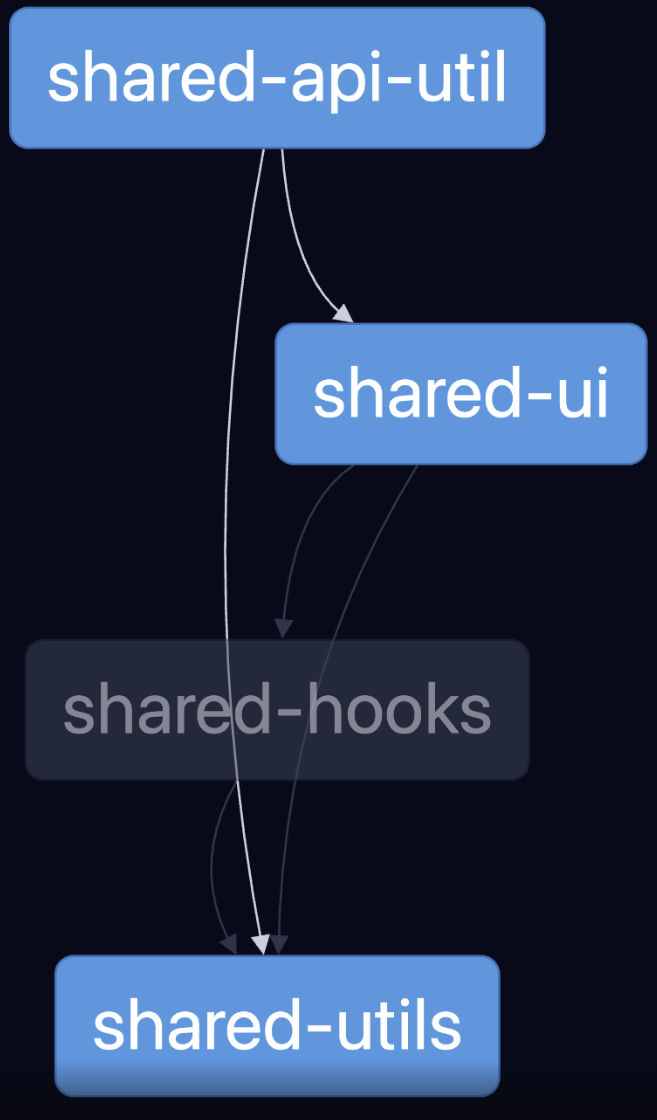
1. 使用 Nx Graph 可視化依賴關係
Nx 提供了強大的圖形化工具來視覺化專案的依賴關係:
npx nx graph這會開啟一個互動式的依賴圖界面,你可以:
- 查看整個專案的依賴結構
- 點擊特定模組查看其依賴和被依賴關係
- 檢測是否存在循環依賴(通常以紅色警告標示)
2. 使用 Nx 命令行工具檢測
除了圖形界面外,還可以使用命令行工具直接檢測循環依賴:
npx nx lint my-app如果設定了適當的 ESLint 規則,循環依賴會在 lint 過程中被報告。
3. 使用編譯器錯誤提示
在開發過程中,TypeScript 編譯器有時會因循環依賴而產生錯誤或警告,例如:
Cannot access 'X' before initializationReferenceError: X is not defined
這些錯誤通常是循環依賴的徵兆。
解決 Circular Dependency 的策略
解決循環依賴問題需要重新思考程式碼的組織和模組間的關係。以下是幾種常用策略:
1. 提取共享模組
最直接的解決方法是識別導致循環依賴的共享功能,將其提取到一個新的獨立模組中。
問題示例:
shared-utils → shared-ui → shared-utils解決方案:提取共享部分到新模組
shared-utils → shared-common
         ↑        ↑
         └── shared-ui
2. 應用依賴反轉原則(DIP)
依賴反轉原則(Dependency Inversion Principle)是 SOLID 原則之一,它建議高層模組不應該依賴於低層模組,兩者都應該依賴於抽象。
問題示例:
// moduleA.js (高層模組)
import { DataProcessor } from './moduleB';

export function processAndDisplay() {
  const data = DataProcessor.process();
  return renderData(data);
}

// moduleB.js (低層模組)
import { renderData } from './moduleA';

export class DataProcessor {
  static process() {
    const data = fetchData();
    // 預處理
    return data;
  }
}解決方案:
// interfaces.js (抽象層)
export interface Renderer {
  render(data: any): void;
}

// moduleA.js
import { Renderer } from './interfaces';
import { DataProcessor } from './moduleB';

export class UIRenderer implements Renderer {
  render(data) {
    // 渲染邏輯
  }
}

export function processAndDisplay() {
  const renderer = new UIRenderer();
  const processor = new DataProcessor(renderer);
  processor.process();
}

// moduleB.js
import { Renderer } from './interfaces';

export class DataProcessor {
  constructor(private renderer: Renderer) {}

  process() {
    const data = fetchData();
    // 預處理
    this.renderer.render(data);
  }
}
3. 使用介面或類型定義分離
在 TypeScript 專案中,可以將類型定義從實現中分離出來,避免循環依賴。
問題示例:
// user.ts
import { Post } from './post';

export class User {
  id: number;
  name: string;
  posts: Post[];
}

// post.ts
import { User } from './user';

export class Post {
  id: number;
  content: string;
  author: User;
}解決方案:
// types.ts
export interface IUser {
  id: number;
  name: string;
  posts: IPost[];
}

export interface IPost {
  id: number;
  content: string;
  author: IUser;
}

// user.ts
import { IUser, IPost } from './types';

export class User implements IUser {
  id: number;
  name: string;
  posts: IPost[];
}

// post.ts
import { IUser, IPost } from './types';

export class Post implements IPost {
  id: number;
  content: string;
  author: IUser;
}
4. 應用依賴注入與控制反轉
Nx 支持使用依賴注入(Dependency Injection)模式,在 React 生態系統中,您可以使用 Context API 或其他依賴注入庫來實現類似的模式。
解決方案示例:
// 1. 創建一個服務上下文檔案: services-context.tsx
import React, { createContext, useContext, ReactNode } from 'react';

// 定義服務介面
interface ServiceA {
  doSomethingA: () => void;
  useBFeature: () => void;
}

interface ServiceB {
  doSomethingB: () => void;
  useAFeature: () => void;
}

interface ServicesContextType {
  serviceA: ServiceA;
  serviceB: ServiceB;
}

// 創建上下文
const ServicesContext = createContext<ServicesContextType | null>(null);

// 服務實現
class ServiceAImpl implements ServiceA {
  private serviceB: ServiceB | null = null;

  setServiceB(service: ServiceB) {
    this.serviceB = service;
  }

  doSomethingA() {
    console.log('Service A doing something');
  }

  useBFeature() {
    if (this.serviceB) {
      this.serviceB.doSomethingB();
    }
  }
}

class ServiceBImpl implements ServiceB {
  private serviceA: ServiceA | null = null;

  setServiceA(service: ServiceA) {
    this.serviceA = service;
  }

  doSomethingB() {
    console.log('Service B doing something');
  }

  useAFeature() {
    if (this.serviceA) {
      this.serviceA.doSomethingA();
    }
  }
}

// 定義提供者元件
export const ServicesProvider: React.FC<{children: ReactNode}> = ({ children }) => {
  // 初始化服務實例
  const serviceA = new ServiceAImpl();
  const serviceB = new ServiceBImpl();

  // 在這裡連接服務之間的依賴關係,解決循環依賴
  serviceA.setServiceB(serviceB);
  serviceB.setServiceA(serviceA);

  // 提供服務實例給所有子元件
  return (
    <ServicesContext.Provider value={{ serviceA, serviceB }}>
      {children}
    </ServicesContext.Provider>
  );
};

// 創建一個自定義 Hook 來獲取服務
export const useServices = () => {
  const context = useContext(ServicesContext);
  if (!context) {
    throw new Error('useServices 必須在 ServicesProvider 內使用');
  }
  return context;
};

// 在元件中使用
export const MyComponent: React.FC = () => {
  const { serviceA, serviceB } = useServices();

  const handleClick = () => {
    serviceA.useBFeature(); // 可以安全地使用循環依賴的服務
  };

  return (
    <button onClick={handleClick}>使用服務</button>
  );
};
實戰案例:解決一個真實的循環依賴問題
以下是我在實際專案中遇到並解決的一個循環依賴問題:
問題背景
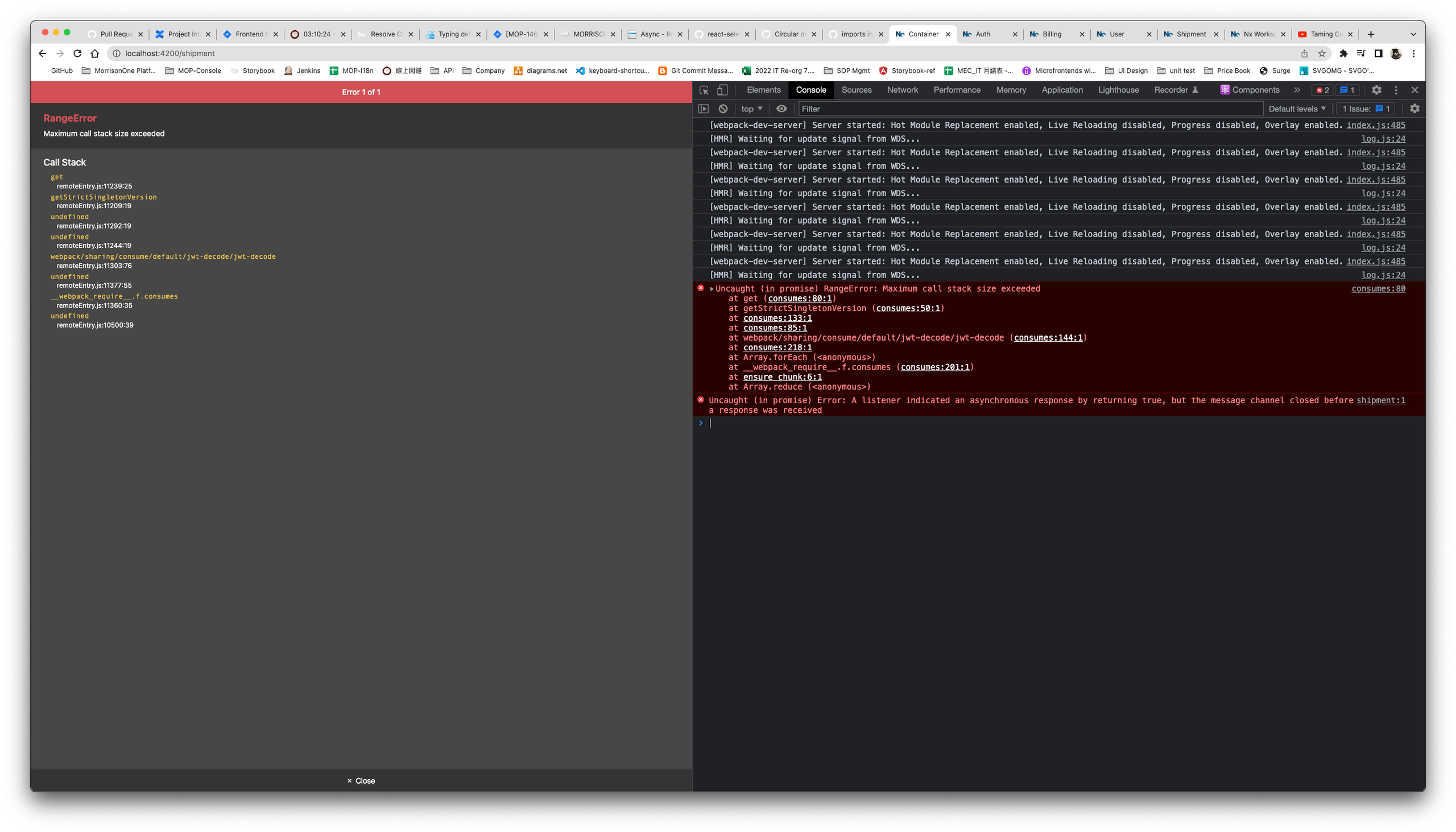
在將公司專案轉換為 Monorepo 架構後,我們發現一個棘手的問題:頁面偶爾會出現白屏現象,重整後又恢復正常。經過調查,我們懷疑這與 Nx 的快取機制和循環依賴有關。
問題分析
首先,我們使用 nx graph 命令檢查專案依賴:
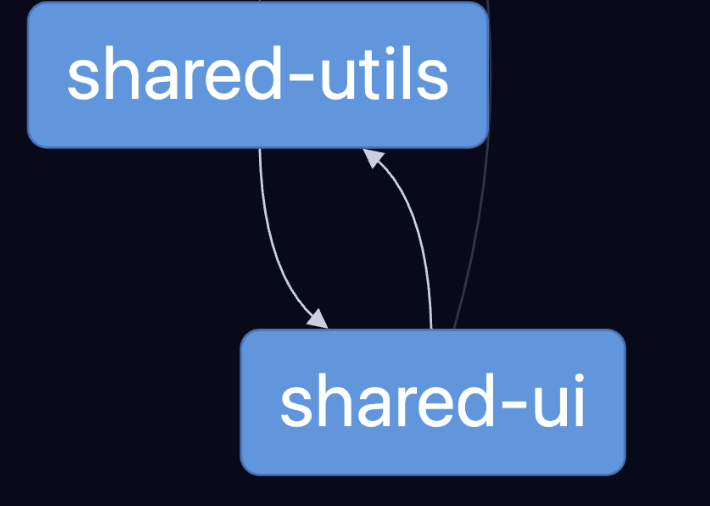
npx nx graph通過可視化的依賴圖,我們發現 shared-utils 和 shared-ui 之間存在循環依賴:
shared-utils包含了一個APIUtil模組,用於處理 API 請求和錯誤shared-ui包含了用於顯示錯誤訊息的ErrorMessage元件APIUtil在處理 API 錯誤時會直接使用ErrorMessage來顯示錯誤- 而
shared-ui中的某些元件又需要使用shared-utils中的工具函數
這形成了明顯的循環依賴:
解決方案
我們採用了「提取共享模組」的策略,將 API 相關的功能從 shared-utils 中分離出來:
- 創建新的
shared-api-utils函式庫:
nx g @nx/react:lib shared-api-utils- 將 API 相關的程式碼移到新函式庫:
// 原來在 shared-utils 中的程式碼
import { ErrorMessage } from '@myorg/shared-ui';

export class APIUtil {
  static async fetch(url) {
    try {
      const response = await fetch(url);
      if (!response.ok) {
        ErrorMessage.show(`API Error: ${response.statusText}`);
        throw new Error(response.statusText);
      }
      return await response.json();
    } catch (error) {
      ErrorMessage.show(`Exception: ${error.message}`);
      throw error;
    }
  }
}
// 重構後在 shared-api-utils 中的程式碼
export type ErrorHandler = (message: string) => void;
export class APIUtil {
static errorHandler: ErrorHandler = console.error;
static setErrorHandler(handler: ErrorHandler) {
this.errorHandler = handler;
}
static async fetch(url) {
try {
const response = await fetch(url);
if (!response.ok) {
this.errorHandler(`API Error: ${response.statusText}`);
throw new Error(response.statusText);
}
return await response.json();
} catch (error) {
this.errorHandler(`Exception: ${error.message}`);
throw error;
}
}
}- 在應用初始化時設置錯誤處理器:
// 在應用程式初始化程式碼中
import { APIUtil } from '@myorg/shared-api-utils';
import { ErrorMessage } from '@myorg/shared-ui';

// 連接 APIUtil 和 ErrorMessage
APIUtil.setErrorHandler((message) => {
  ErrorMessage.show(message);
});
驗證解決方案
重構完成後,我們再次運行 nx graph 檢查依賴關係:
npx nx reset  // 清除 Nx 快取
npx nx graph
現在依賴結構變成了:
循環依賴被成功打破,白屏問題也隨之消失。
最佳實踐:預防循環依賴
預防勝於治療,以下是幾項可以幫助避免循環依賴的最佳實踐:
1. 遵循清晰的架構模式
採用清晰的架構模式,如分層架構、洋蔥架構或六角架構,並嚴格遵守其依賴規則。例如,在分層架構中,上層模組可以依賴下層模組,但下層不能依賴上層。
2. 定期審查依賴圖
定期使用 nx graph 檢查專案的依賴結構,及早發現潛在問題。
3. 在 CI 流程中加入檢測
在 CI 流程中加入循環依賴檢測,確保新程式碼不會引入循環依賴:
# .github/workflows/ci.yml
jobs:
  check-dependencies:
    runs-on: ubuntu-latest
    steps:
      - uses: actions/checkout@v3
      - uses: actions/setup-node@v3
      - run: npm ci
      - run: npx nx lint --configuration=ci
4. 考慮依賴方向
設計新模組時,考慮其在整體依賴圖中的位置,確保依賴方向的一致性。
5. 使用適當的 Library 類型
如我們在第三篇文章中討論的,合理使用 Nx 的 Library 類型(Feature、UI、Data Access 等)可以幫助預防循環依賴。例如:
- UI Library 應該只依賴其他 UI Library 和 Utility Library
- Data Access Library 不應該依賴 UI Library
- Feature Library 可以依賴 UI 和 Data Access Library,但不應被它們依賴
結語
循環依賴是 Monorepo 轉型過程中常見但易被忽視的問題。通過本文介紹的分析方法和解決策略,你可以有效地識別並解決專案中的循環依賴問題,建立更健康、更可維護的程式碼結構。
在實作中,解決循環依賴不僅是技術問題,更是對程式碼設計和架構的重新思考。每解決一個循環依賴問題,你都在為團隊累積寶貴的經驗,推動團隊朝著更優雅、更模組化的方向發展。
最後,請記住:預防循環依賴的最佳方法是從一開始就遵循良好的設計原則和架構模式,定期審查依賴結構,並在問題出現時果斷重構。
相關資源
你有遇過類似的循環依賴問題嗎?歡迎在評論區分享你的經驗和解決方案!